Choosing Your Computer
Windows or Mac or Linux
For most home users the choice will be between purchasing a computer running the Windows operating system or a Mac computer. Not many users start-off using the Linux OS although most linux destros are free to use and have fewer security problems than the better known Windows OS.
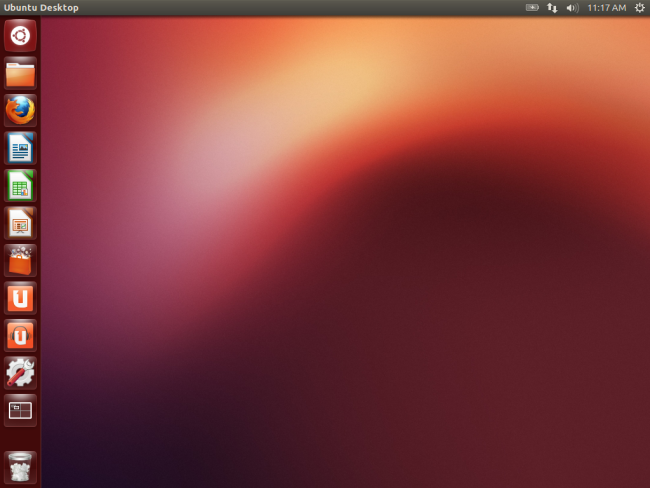
This is a picture of an Ubuntu Linux PC desktop. This operating system is free to use unlike windows and mac operating systems. Ubuntu is just one of many different flavours of the linux operating system. Ubuntu also has a server edition separate from the desktop edition.
Choosing a Personal Computer
Before selecting a computer you should decide on what software you plan to be using. Do not expect all software to work on all computers. Research your software preferences first then choose a computer that has the resources to run the software you plan to use on the computer. The main resources you must consider will be the operating system, the amount of random access memory needed and the storage space needed on your fixed disk or hard-drive. A large number of computer users are now choosing laptop and tablet computers over desktop computers.
Choosing The Right System
Ideally, you should always choose the most affordable computing system that will fully meet your needs. Overtime, the cost of hardware decreases while the power increases.
A typical office worker running standard office applications such as Microsoft word, excel, powerpoint, surfing the internet and using email will get all the performance needed from a modern standard business PC but there are times you need even more power and that is where a workstation comes in.
A workstation is a desktop computer that has a more powerful processor, large-capacity solid-state drives, additional memory, high-end graphics adapters and enhanced capabilities for performing a special group of tasks, such as 3D graphics. Workstations are designed for high performance and heavy workloads. Regular desktop computers, are intended for individual users; but they differ from desktops in that they are much faster and cost as much as twice the price of a typical desktop PC.
A server is another powerful computer that has been optimized to provide services to other computers over a network, network servers usually have powerful processors, lots of memory and large hard drives.
Unlike a desktop or laptop PC, you don't sit down at a server and type. Instead, a server provides lots of computer power through a local area network (LAN) or over the internet. Servers are often stored on racks in a dedicated server room. Like regular PCs, servers have typical computer components.
There are different types of servers :
- Web server - These serve webpages
- Email server - These hold and manage email messages
- File server - These allow users to logon, upload files and download files on a network
- DNS server - Domain Name Server translates domain names into the corresponding IP addresses.
- FTP server - These host a file exchange among users
- Print server - These allow many users to send print jobs to a queue to be printed
- Database server - These allow multiple users to access a database and run querries
Network server
A server, or network server, is a central computer that holds collections of data (databases) and programs for connecting or supplying services to PCs, workstations, and other devices, which are called clients. These clients are linked by a wired or wireless network. The entire network is called a client/server network. A webserver is used to store and serve webpages to be viewed on the internet. In small organizations, servers can store files, provide printing stations, and transmit email. In large organizations, servers may also house enormous libraries of financial, sales, and product information.
DNS server
The Domain Name System ( DNS) is the phonebook of the Internet. The most important function of DNS servers is the translation of human-memorable domain names into the corresponding numeric Internet Protocol addresses.
DNS servers translate the friendly domain name you enter into a browser (like Yahoo.com) into the public IP address that's needed for your device to actually communicate with that site.
Virtual server
A virtual server re-creates the functionality of a dedicated physical server. It exists transparently to users as a partitioned space inside a physical server. Benefits of virtual servers include faster provisioning of applications and resources, improved disaster recovery and business continuity, and minimized or eliminated downtime. Virtualization also increases IT productivity.
- More about Virtual server 5 minutes
- Server FAQ
Questions
- Why are some networks called client/server networks?
- Besides client/server networks what other kind of network do you know of?
- What is a DNS server used for?
- Where would you most likely find virtual servers : a) Home b) small to medium size company c) Very large organizations
Test Yourself
Class Exercise
Write the answers to these questions in your notebook :
- Rearrange the devices on this list from the least powerful to the most powerful ( workstation, cellphone, server, laptop )
- Which one of the above you do not find users sitting at and performing typical office tasks?
- How is a workstation different from a server?
- Give an example of a task that would be suitable for a workstation.
- Give an example of a task that is suitable for a server.
- Which is more expensive a PC or a workstation? Give a reason for your answer.
- What type of server is used strictly to host the exchange of files among users?
- An office typist who also prepares presentations for her office manager requested a workstation from her supervisor. If you are the supervisor what will your response be? Give a reason for your answer.